
TL;DR
- A FinOps agent connects to cloud cost data and investigates spending changes across services, resources, and time periods.
- Unlike a dashboard, it does more than display totals. It explains likely causes and surfaces relevant next steps.
- Unlike a chatbot, it can monitor new data and begin investigations without waiting for a prompt.
- A capable FinOps agent should answer questions, investigate anomalies, explain cost drivers, and flag optimization opportunities with context.
- Clear guardrails still matter. Read-only access, defined permissions, approval controls, and visible reasoning help teams trust the system.
- Noros.ai applies this model to AWS, GCP, and Azure data through a conversational, read-only interface.
Cloud spend rarely jumps because of one big decision. More often, it creeps up as teams ship features, spin up test environments, and add workloads that each look small on their own, until the bill reflects choices nobody reviewed together.
That gradual buildup is part of why the increase is hard to catch early, since most teams only notice once costs have already climbed. Catching it sooner usually takes dedicated FinOps expertise, someone watching the data before it turns into a surprise.
Without that person, the job falls to whichever engineering or finance leader sits closest to the infrastructure. They investigate on top of their existing workload, and that's manageable while things stay simple. It gets harder fast as infrastructure grows more complex.
Agentic FinOps is one response to that gap. The category is still young, but the idea behind it is straightforward: instead of waiting for someone to pull a report, the system starts investigating on its own and returns something useful.
This guide covers what a FinOps agent is, how it works, and what teams should expect from one.
What's driving the need for agentic FinOps?
Cloud providers have offered cost dashboards and usage reports for years, and those tools do show where the money went. The harder part has always been interpreting what that data actually means.
Someone still has to choose the right filters, compare time periods, and dig into which services were involved, then connect that cost change back to the infrastructure decision that caused it. It's detective work, and it takes real expertise to do well.
Three converging shifts make cloud spend harder to predict by hand, which is why continuous investigation matters more than another manual report.
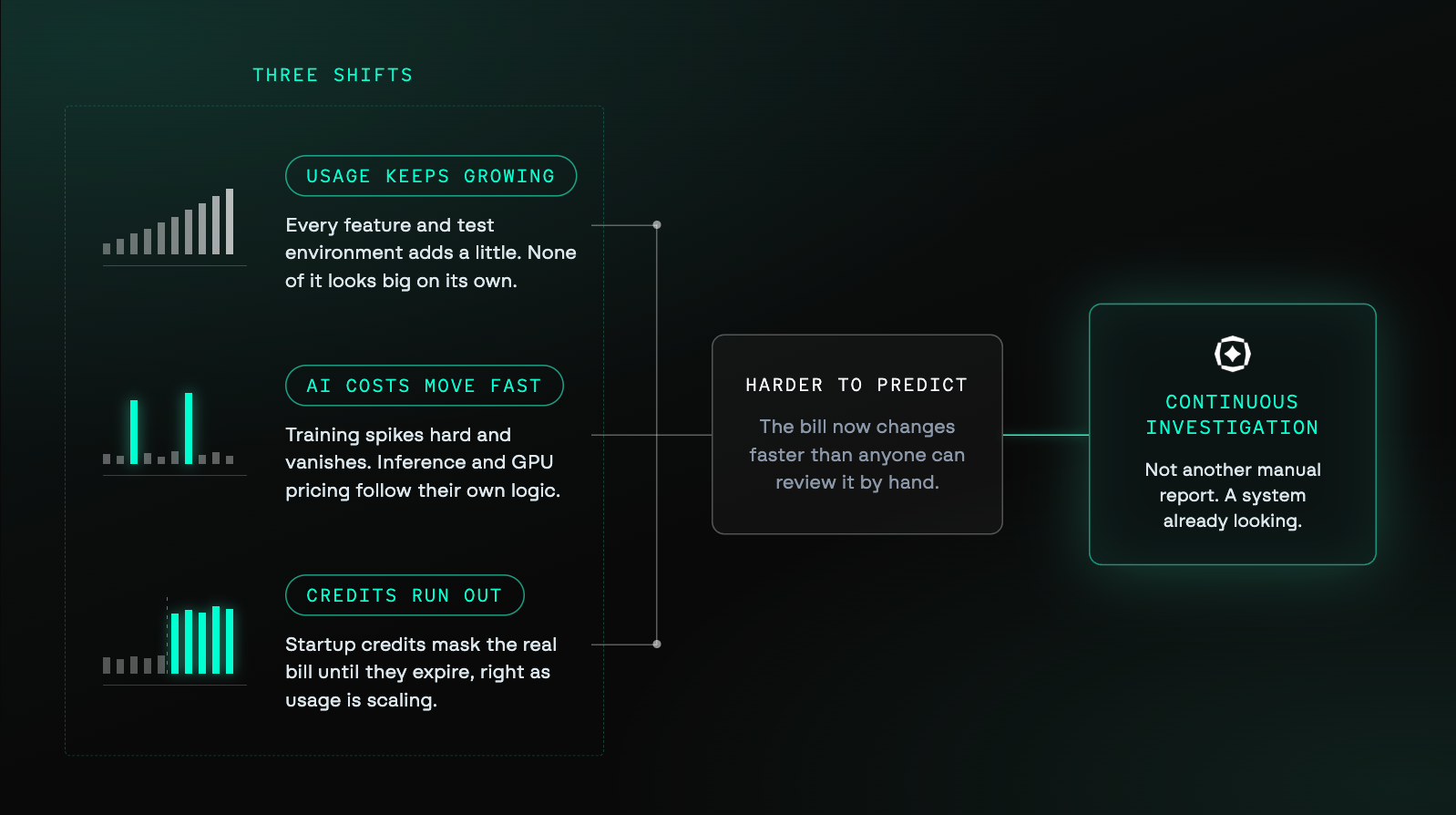
Cloud usage keeps growing
Every feature, test environment, and workload adds a little more to the bill. None of it looks significant on its own, but multiply that across teams and accounts, and the small stuff adds up fast, often into a total that's hard to trace back to any single decision.
AI introduces less predictable costs
AI workloads don't behave like the infrastructure most cost tools were built around. Training runs spike hard and then disappear. Inference costs shift with usage, traffic, and token volume, and GPU capacity comes with its own pricing logic entirely.
Manual reporting processes struggle to keep pace with costs that move this fast.
Cloud credits eventually expire
Startup credits are generous, but there's a downside to that. They mask the real cost of a company's infrastructure during the early growth years.
Then the credits run out, usually right as usage is scaling and the business has more customers, more workloads, and more priorities competing for attention than ever.
Agentic systems offer a way to investigate these shifts, without asking teams to build another manual process to do it.
What is a FinOps agent?
A FinOps agent is an AI system connected to cloud cost and usage data. It investigates spending changes and returns explanations, findings, or recommended actions.
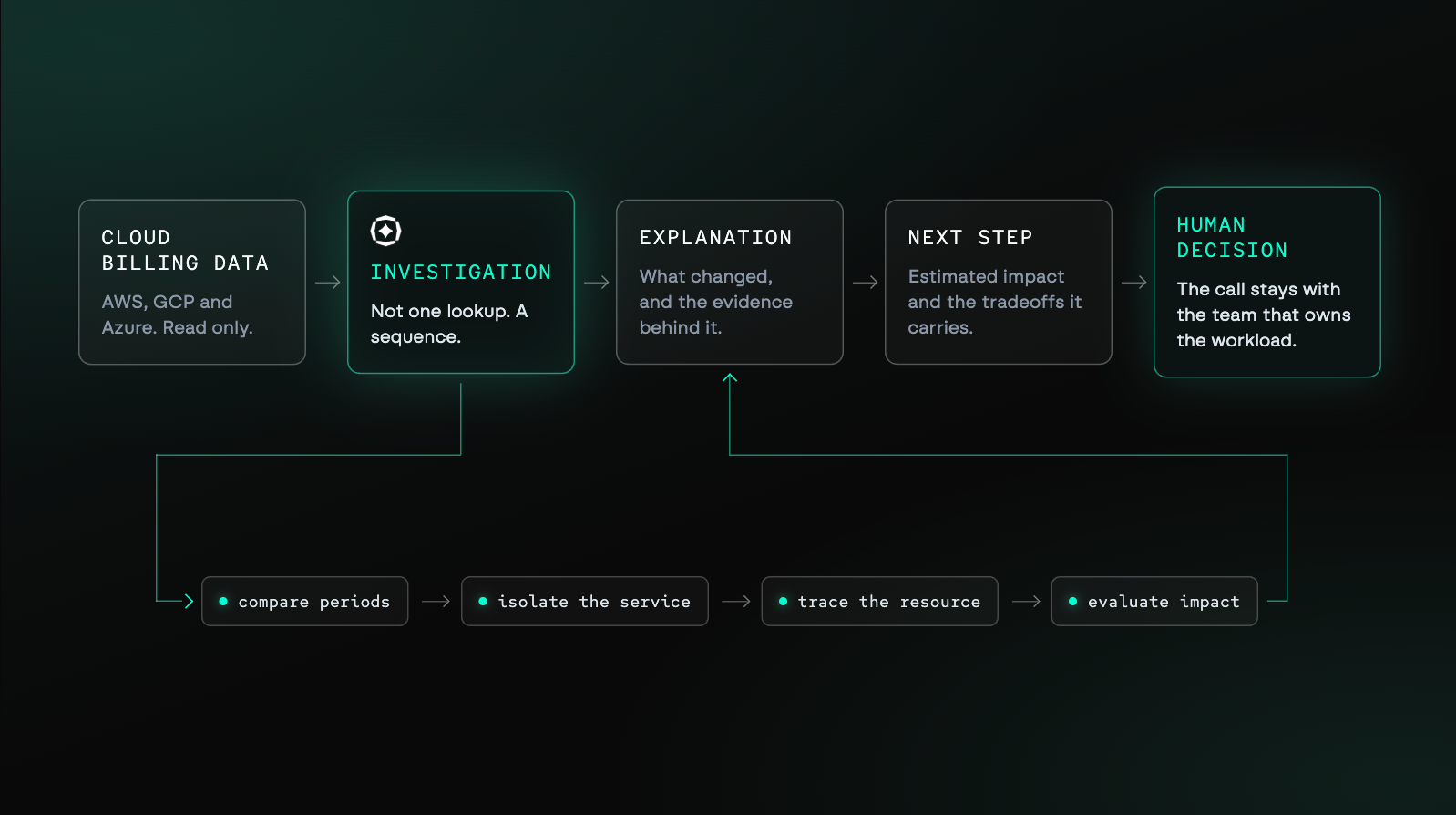
A capable FinOps agent can:
- Analyze cost and usage data as it becomes available
- Compare spending across accounts, services, and time periods
- Trace changes to workloads or infrastructure decisions
- Prioritize findings by financial and operational impact
- Produce explanations, alerts, or recommended actions
The interface alone does not make a system agentic. Rather, it's the agent's ability to investigate a question across several steps.
For example, an agent should not stop after reporting that compute spend increased. It should examine the affected account, service, region, resource, and time period. Then, it should explain what contributed to the change and why it matters.
Dashboard vs. Chatbot vs. Agent
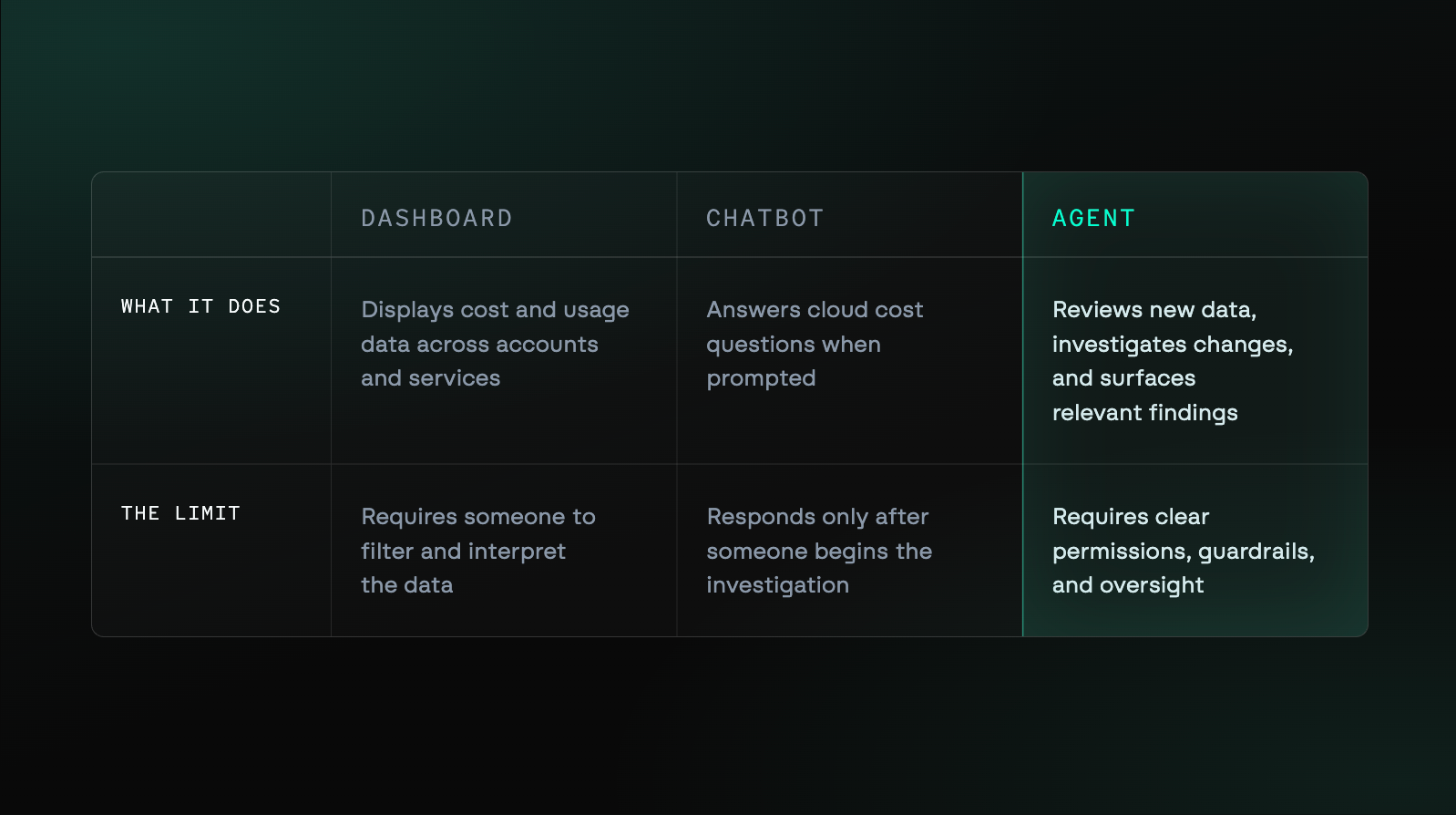
These categories can overlap. A FinOps product may include dashboards, conversational search, and agentic workflows within one system.
What should a FinOps agent do?
A FinOps agent should help teams understand cloud costs without building reports first. It should investigate changes, explain their causes, and surface useful next steps.
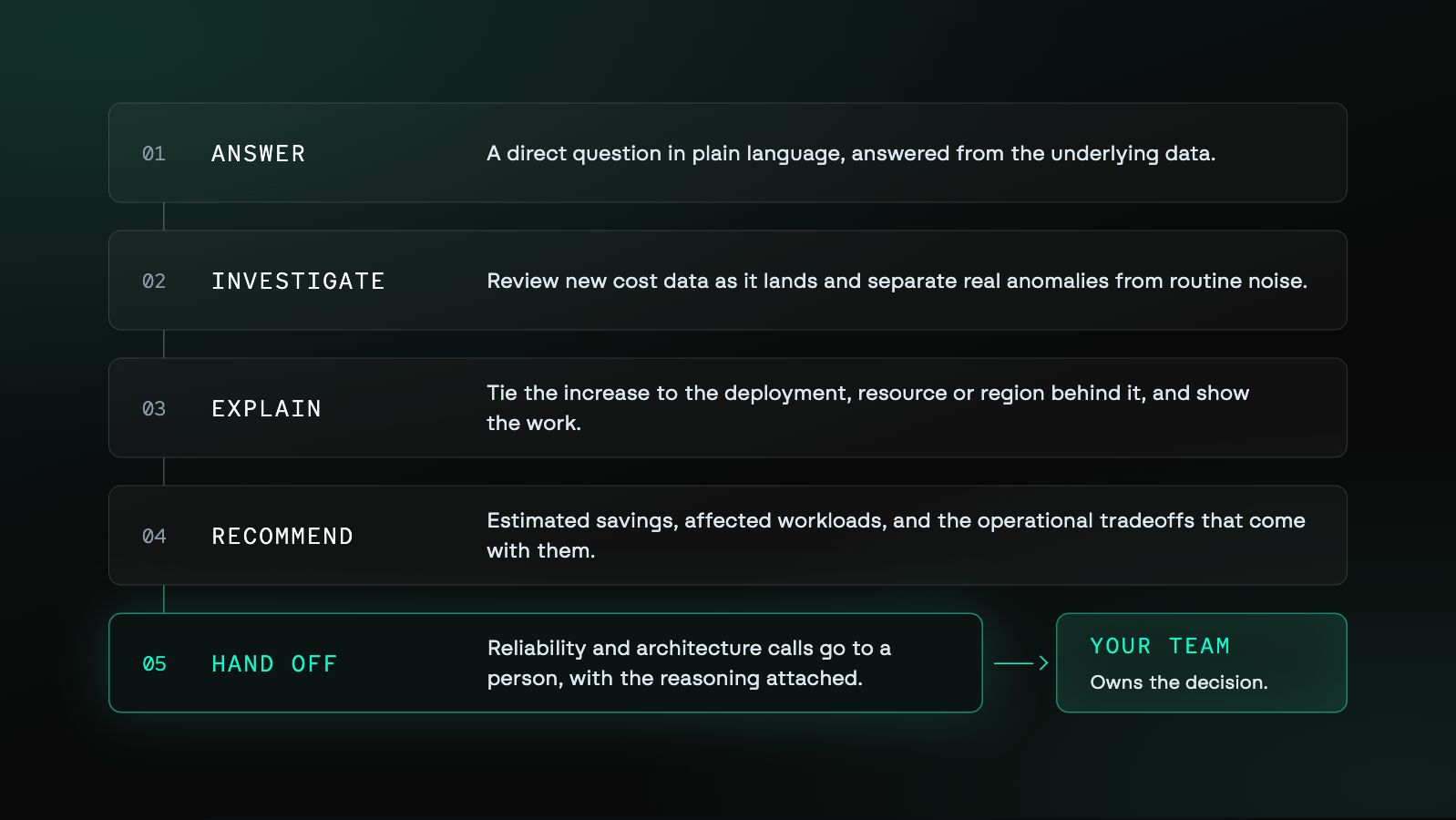
Answer cloud cost questions in plain language
A FinOps agent should let users ask direct questions about their cloud spend.
For example, someone might ask why Amazon Elastic Compute Cloud (EC2) spend increased this week. In response, the agent should identify the relevant accounts, resources, services, and time periods.
It should then return a clear explanation supported by the underlying data.
Investigate anomalies before they become surprise bills
A FinOps agent should review new cost and usage data as it arrives. When monitoring identifies an unexpected change, the agent should begin investigating its cause.
The agent should separate meaningful anomalies from routine fluctuations. It should also explain the contributing cost drivers and estimated financial impact.
Explain cost drivers, not just report totals
Reporting that compute spend increased is not enough.
A useful agent should connect that increase to the infrastructure change behind it. The cause might be a deployment, resource, region, or usage pattern.
The explanation should also show how the agent reached its conclusion.
Flag optimization opportunities with context
A savings estimate alone does not make a recommendation useful.
The agent should explain what would change and which workloads may be affected. It should estimate potential savings and identify relevant operational tradeoffs.
That context helps finance and engineering evaluate the recommendation together.
Know when to hand the decision to a human
A FinOps agent should operate within defined permissions and guardrails. It can investigate, explain, and recommend actions without making every decision independently.
Changes involving reliability, architecture, or business priorities may require human approval. The agent should make that handoff clear and include its reasoning.
What guardrails should a FinOps agent have?
A FinOps agent needs clear boundaries around access, recommendations, and actions. It's important to understand those controls before connecting the agent to cloud environments.
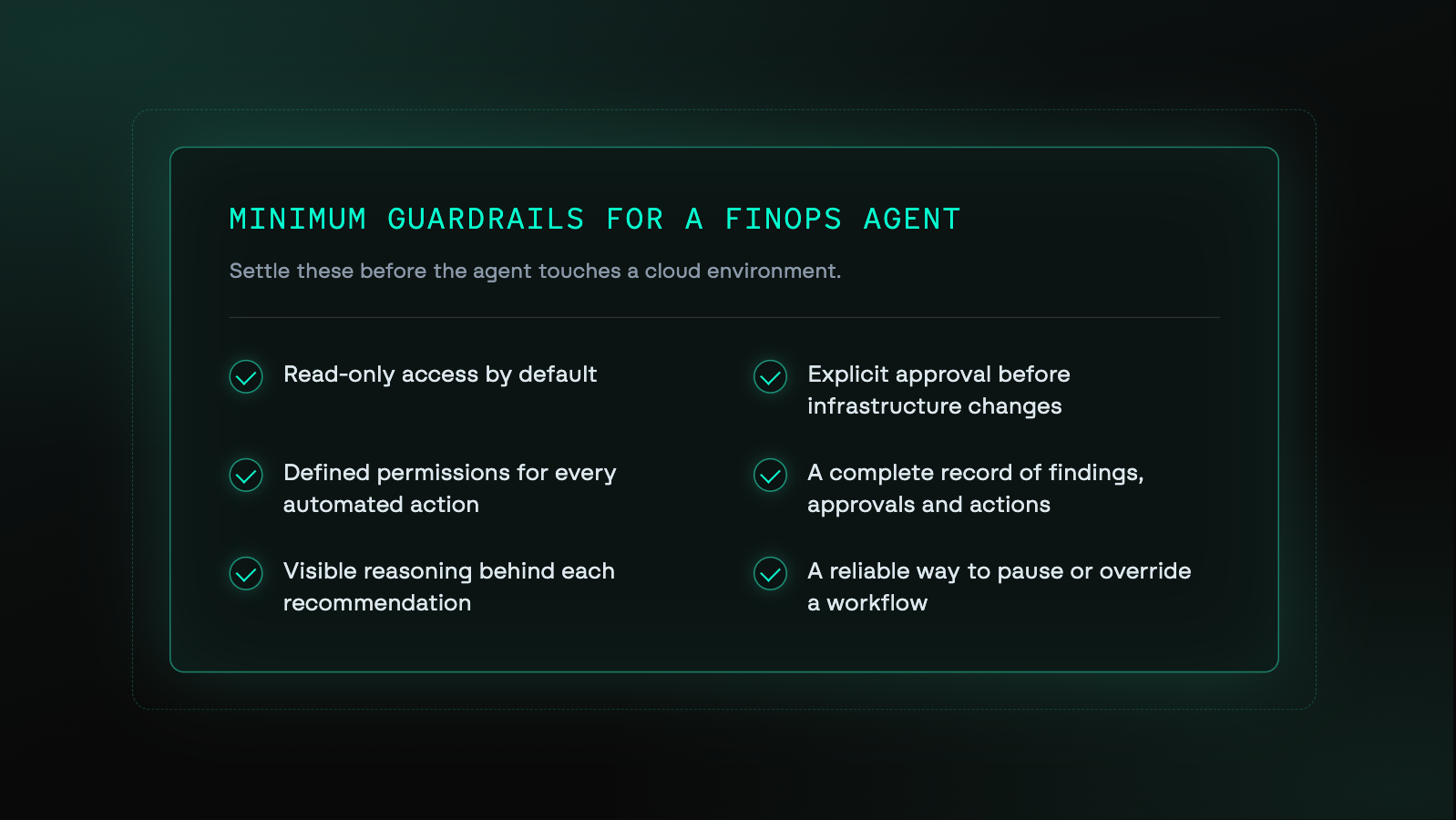
At minimum, teams should expect:
- Read-only access by default
- Explicit approval before infrastructure changes
- Defined permissions for every automated action
- A clear record of findings, recommendations, approvals, and completed actions
- Visible reasoning behind each recommendation
- A reliable way to pause or override automated workflows
Some agents may act within pre-approved policies. However, those permissions should remain narrow, documented, and reversible.
How Noros puts agentic FinOps into practice
Without dedicated FinOps support, the exposure to unexpected cloud costs doesn't go away, it just goes unwatched. That responsibility usually lands on whichever engineering or finance leader is closest to the infrastructure, on top of everything else they're already handling.
Noros gives teams a direct way to investigate cloud cost changes without building a report or needing an analyst on call.
Let's think of this in a real scenario: your Amazon EC2 spend increased this week, and the cause isn't clear yet.
Start with a direct question
After connecting your cloud account, you ask Noros:
Why did our EC2 spend increase this week?
No report, no filters to configure first. Noros takes that question and starts investigating the underlying cost data right away.
Trace the change to its source
Noros looks at the resources, services, usage types, and time periods behind the increase.
Instead of just telling you the total went up, it points to what's actually driving it, a specific service, a resource, a usage pattern, along with the data backing that up. That's what tells you whether this is a normal fluctuation or something worth a closer look.
Review the recommended next step
Once Noros has traced your EC2 increase to its cause, it can also surface what to do about it.
If there's an optimization opportunity tied to that resource, Noros explains the potential impact alongside it. You decide whether the change makes sense for how that workload actually runs.
Noros handles the investigation and the reasoning. The decision stays with your team.
Build it into your existing workflow
That one question about EC2 doesn't have to be a one-off. You can set up alerts so Noros flags similar anomalies on its own, or watches budgets and commitments without you asking each time.
Teams without dedicated FinOps support finally have a place to ask these questions as they come up. Teams that already have FinOps in place get to spend less time digging and more time on decisions that actually need a person.
Get a direct answer before the bill becomes a surprise
The cloud bill still changes, and someone still asks what happened. The difference is that the investigation no longer begins with dashboards, exports, and manual filters.
With a FinOps agent, the team can ask the question directly. Noros investigates the change, explains the likely cause, and surfaces the next step within seconds.
That gives engineering, finance, and leadership a shared answer sooner. It also helps teams respond before small cost changes become larger problems.
Ready to understand what is driving your cloud bill?
Start a free 14-day trial at noros.ai. Connect the accounts you want to track, and you can have answers within the hour.
Noros starts at $99 per month. No long-term commitment required.
Frequently asked questions (FAQs)
What is a FinOps agent?
A FinOps agent is an artificial intelligence system connected to cloud cost data. It investigates spending changes, answers questions, and surfaces relevant next steps.
Unlike a reporting tool, it can reason across several data points before responding.
How is a FinOps agent different from a cloud cost dashboard?
A dashboard displays cost and usage data for someone to interpret.
A FinOps agent investigates changes, explains likely causes, and surfaces relevant findings. It reduces the manual work required to move from a number to an answer.
How is a FinOps agent different from asking ChatGPT to read a CSV?
A CSV contains a static snapshot of previously exported data.
A FinOps agent connects to cloud billing data as it becomes available. It can investigate across services, resources, usage types, and time periods without requiring another export.
Do I need a FinOps agent without a dedicated FinOps team?
A FinOps agent can help teams understand spend before hiring dedicated specialists.
It gives engineering and finance a shared place to investigate cost changes. Established FinOps teams can also use agents to reduce repetitive reporting and analysis.
Can a FinOps agent change my cloud infrastructure?
Some FinOps agents can change infrastructure when granted explicit permissions.
Teams should expect read-only access by default and clear approval controls. Any automated actions should follow narrow, documented, and reversible policies.
How does Noros work as a FinOps agent?
Noros connects to cloud billing data and lets users investigate costs through conversation.
It can analyze spending changes, detect anomalies, surface savings opportunities, and monitor existing commitments. Its responses are grounded in data from the selected cloud account.
What cloud providers can Noros analyze?
Noros supports AWS, GCP, and Azure.
Teams can connect multiple accounts across supported providers. Questions are answered using data from the account selected within Noros.
Is Noros read-only?
Yes. Noros uses read-only access to cloud cost and billing data.
For AWS, it connects through a read-only Identity and Access Management role. For GCP, it accesses only the shared BigQuery billing dataset.
Noros cannot create, stop, terminate, or modify cloud resources.